
Software & services
Tachus builds the software that runs its hardware - scoring, analytics and range displays, and backs every installation with training and support from Bengaluru.
01 · Scoring
Tachus Scoring Software
Included with every target system at no additional software cost: Windows scoring software and an Android application optimized for tablets in portrait orientation.
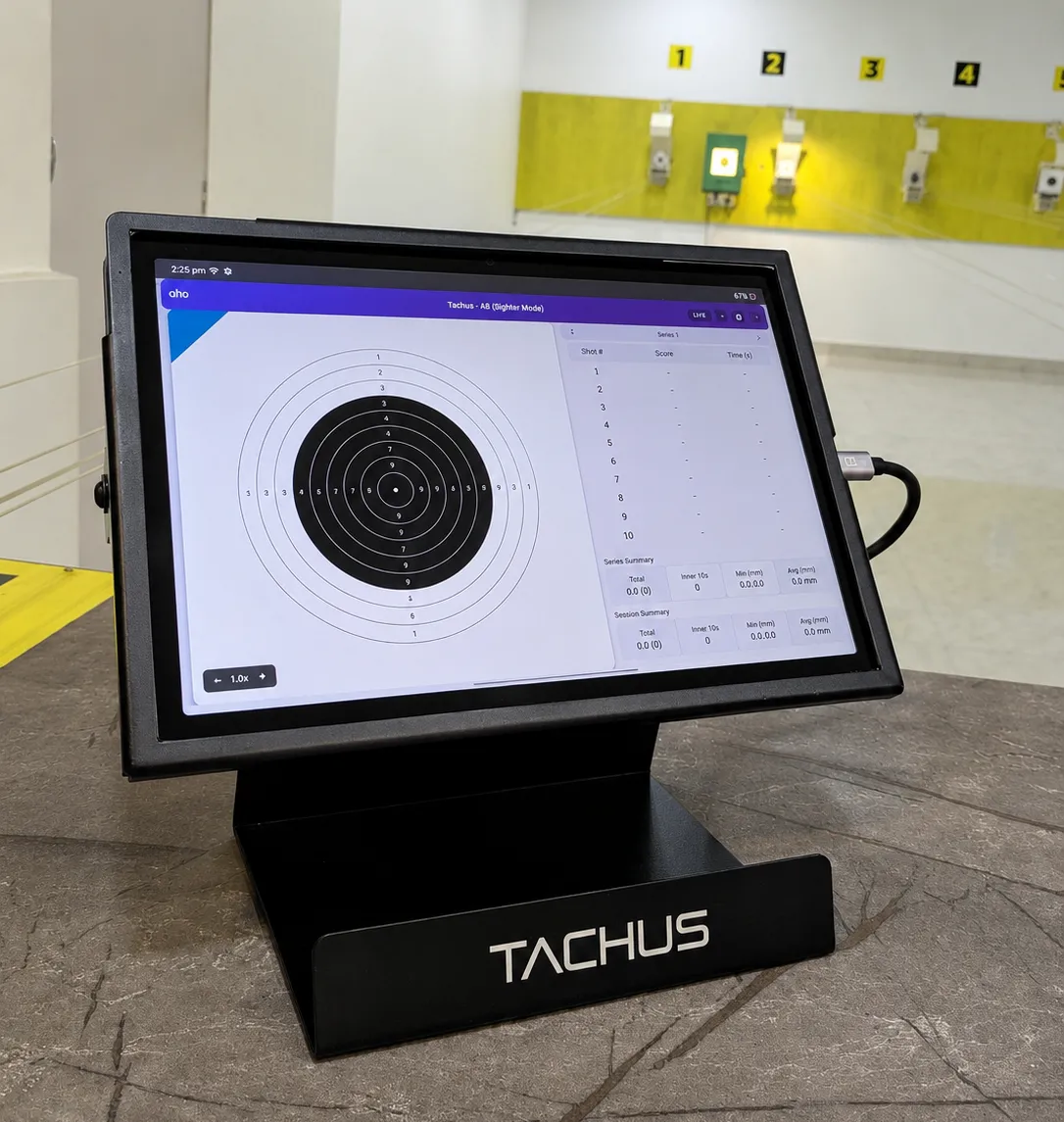
On every shot
- Shot number, decimal score and direction for every shot
- Shot time, inner ten count, MPI and group on screen
- Series totals and match totals, compiled automatically
Customisation
- Pellet type
- Target colour in UI
- Scoring table look
- UI screen
Session setup
- Event
- Paper movement
- Mode
- Guided checks
- Reports
On 25 Meter systems, Tachus 25 Scoring Software also sets and customises the green/red illumination timings, directly from the software.
Designed specifically for 3P rifle training
Tachus 50 Electronic Target System and Tachus 50/10 Electronic Target System include 3P applications for Windows and Android. Shooters can train across the kneeling, prone and standing positions used in the 50 Meter Small bore Rifle 3 Positions event.
Training modes and drills
More than scoring.
Tachus 10 Electronic Target System includes Tachus Scoring Software for Windows and the Tachus Android tablet application at no additional software cost. The selected capabilities below are available in both applications.
These are selected capabilities. Additional training modes and software tools are also included.
- 01
ISSF Final Simulation
Practise using ISSF Final Simulation Mode with audio commands guiding the shooter through the session.
- 02
Delayed score display
Choose when the score appears after each shot, helping the shooter maintain attention on hold and follow through before reacting to the result.
- 03
Focus Mode
A dedicated training mode for both Air Rifle and Air Pistol, designed to support visualization and concentration.
- 04
Group Analysis
A dedicated analysis feature helps shooters discover whether points were lost because of group size.
- 05
Match Replay
Replay completed Standard matches shot by shot. Pause, resume or restart; choose 1×, 2× or 4× speed; or select a particular shot from the table.
- 06
Performance Drills
Use dedicated drills designed to develop skill and control under match pressure.
Windows scoring software
More ways to train and review.
Alongside live scoring and session totals, the Tachus software gives shooters practical tools for practice, comparison and review.
- 01
Companion Mode
Practise a match of 60 shots against a virtual opponent. Choose Beginner, Intermediate or Pro level and compare your progress on separate targets.
- 02
Shot Calling
Mark where you think your shot landed before its result is revealed, then compare your call with the actual shot to assess score and direction awareness.
- 03
Guided Sessions
Get a coaching cue after every 10 match shots in General and Free Practice sessions, using your scores, shot rhythm and group position.
- 04
Full Screen Mode
Fill the screen with your target for a clearer view. In Companion Mode, open either target independently.
- 05
PDF report analytics
Review series comparisons, shot rhythm, time per series and score distribution within eligible General and Free Practice reports.
What the software sees
A session, shot by shot.
Decimal scores, series totals and shot rhythm from one representative air pistol session with 60 shots. Hover any point for its exact value; select a series to isolate it.
02 · Analytics
Tachus Analytics Reports
Meaningful information for shooters and coaches, session by session: individual series breakdowns and comparative tables, rhythm analysis, score progression and shot distribution.
About the reports →03 · Range displays
Tachus Display Manager
A scoring and range display system that runs on the local range network: lane tablets, an operator interface in the browser and a TV display, with an optional public Live View that cannot control the range.
About Display Manager →04 · Services
From installation to everyday support
Installation
Systems are installed and commissioned with the range, and ranges that relocate have installed Tachus systems again at new premises with our support.
Training
Range staff are shown how to run sessions, matches and routine upkeep: paper rolls, rubber rolls and pellet traps.
Maintenance
Routine maintenance uses replaceable consumables and is designed for range staff.
Support
Phone (+91-9353981436), WhatsApp and email support from the Bengaluru team, known among our ranges for fast responses.
Next step
Ask about software and services
Whether you need a demo, a training session or support for an installed system, our team responds within one working day.